
Monday, September 1, 2014

Digital tone control with MAX5406

The series will I make here is a series regulator of Volume, Bass, and Balance Trable Digital (Tone Control). The core of this circuit is an IC-type output from the Manufacturer Maxim MAX5406, while the IC is an audio processor that comes with the interface switch hit for Tone Control setting above. The circuit scheme is as follows:

The scheme above uses very little supporting components and this makes can be made with a mini size of a matchbox only even if using all SMD components can be reduced in size by half for this time I will only give a simple layout made​​, following picture:

layout components


Read More..

TEST MODE FACTORY INITILIZE SONY SONY DIGITAL BOOK READER PRS T1

FACTORY INITILIZE – TEST MODE – SONY DIGITAL BOOK READER- PRS-T1
TEST MODE
PREPARATION OF THE TEST MODE
Prepare the following before executing the test mode.
* PC
* USB cable for PC connection (MICRO B)
* File for the test mode
Note: Confirm the method of obtaining the file for test mode to each service headquarters.
Procedure:
* Press the [Power] key to turn the power on.
* Confirm the HOME menu was completely displayed, and connect this unit to PC by the USB cable (MICRO B).
* Confirm the USB connection screen displayed, and touch the “Data Transfer Mode”.
* Confirm the “READER” drive of this unit is recognized.
* Copy the file for the test mode from PC to directly under the “READER” drive of this unit.
* Remove this unit and USB cable (MICRO B) from PC.
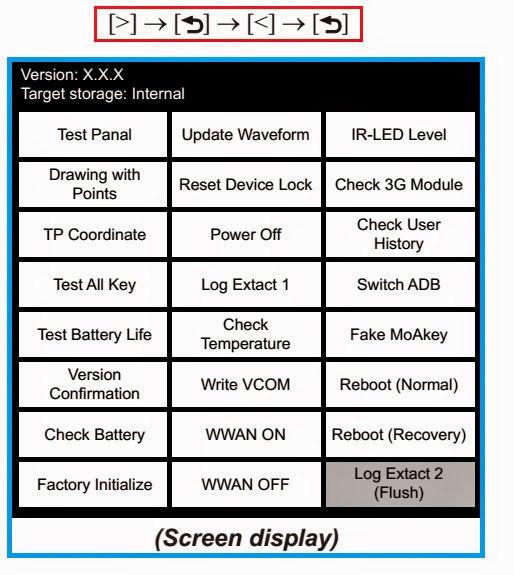
* Confirm the HOME menu was completely displayed, and press the key as following order.
After a while, the test mode menu is displayed, and this unit enters the test mode.
RELEASING THE TEST MODE
* Press the [Return] key, and confirm the HOME menu was completely displayed.
* Connect this unit to PC by the USB cable (MICRO B).
* Confirm the USB connection screen displayed, and touch the “Data Transfer Mode”.
* Confirm the “READER” drive of this unit is recognized.
* Delete the file for the test mode from directly under the “READER” drive of this unit.
* Remove this unit and USB cable (MICRO B) from PC.
* Confirm the HOME menu was completely displayed, and press the key as following order, and confirm that the test mode does not enter.
* Press the [Power] key for 5 seconds or more, and touch the “Yes” to turn the power off. [Never forget to delete the file for the test mode]
OPERATION OF EACH MODE
* Touch the “Test Panel” in the test mode menu.
* The image file is displayed (image files of in the directly as “/testmode/images/”).   The format that can be treated is “.bmp”, “.jpeg” , “.gif” and “.png”.   The all image files are transformed into the 600 x 800 size, and the linear interpolation processing of pixel is done.
* Press the [<]/[>] keys, the image files are changed.
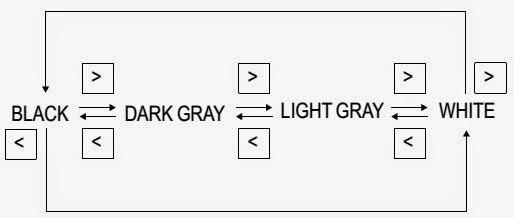
Note: If there are no image files, the screen changes into grayscale color. Press the [<]/[>] keys, the grayscale color changes sequentially as shown in the figure below.
Releasing method:
Press the [Return] key, return to the test mode menu.
Drawing with Points:  This mode is not used in servicing.
TP Coordinate:  This mode is not used in servicing.
Test All Key:  This mode is not used in servicing.
Test Battery Life:  This mode is not used in servicing.
Version confirmation:  This mode is not used in servicing.
Check Battery:  This mode is not used in servicing.
Factory Initialize
This unit can be returned to the state of the factory shipment.
Touch the “Factory Initialize” in the test mode menu.
When “Yes” is touched, the deletion of all histories and reset of all settings are executed, and then this unit turns the power off.

Read More..

Blinking LED circuits

Blinking
This led series will Blinking alternately, The way it works is determined by IC NE555 and transistors are used as reinforcement for each section (20 upper, 20 lower) work optimally. 555 circuit below is a flashing bicycle light powered with four C, D or AA cells (6 volts). 

Read more
Read More..

230V Led Flasher circuit diagram


This is a 230V LED flasher schema diagram.I thought to give you this schema because of the on coming Wesak festival.By using this schema you can flash your LED with 230V.If you want to add more LEDs you can simply add a relay and connect the rest of LEDs via it.I suppose adding a relay is the most easiest way for beginners.


# Note

1) Build this schema on a pcb

2) Always use the correct values of electronic items.

3) THIS CIRCUIT IS NOT SUITABLE FOR CHILDREN IF YOU ARE A CHILD DONT TEST THIS CIRCUIT
Read More..

Invisible Broken Wire Detector

Invisible Broken Wire Detector Circuit diagram. Portable loads such as video cameras, halogen flood lights, electrical irons, hand drillers, grinders, and cutters are powered by connecting long 2- or 3-core cables to the mains plug. Due to prolonged usage, the power cord wires are subjected to mechanical strain and stress, which can lead to internal snapping of wires at any point. In such a case most people go for replacing the co e/cable, as finding the exact loca Portable loads such as video cameras, halogen flood lights, electrical irons, hand drillers, grinders, and cutters are powered by connecting long 2- or 3-core cables to the mains plug. Due to prolonged usage, the power cord wires are subjected to mechanical strain and stress, which can lead to internal snapping of wires at any point.

 In such a case most people go for replacing the core/cable, as finding the exact location of a broken wire is difficult. In 3-core cables, it appears almost impossible to detect a broken wire and the point of break without physically disturbing all the three wires that are concealed in a PVC jacket.  The schema presented here can easily and quickly detect a broken/faulty wire and its breakage point in 1-core, 2-core, and 3-core cables without physically disturbing wires.  It is built using hex inverter CMOS CD4069. Gates N3 and N4 are used as a pulse generator that oscillates at around 1000 Hz in audio range.

The frequency is determined by timing components comprising resistors R3 and R4, and capacitor C1. Gates N1 and N2 are used to sense the presence of 230V AC field around the live wire and buffer weak AC voltage picked from the test probe. The voltage at output pin 10 of gate N2 can enable or inhibit the oscillator schema. When the test probe is away from any high-voltage AC field, output pin 10 of gate N2 remains low. As a result, diode D3 conducts and inhibits the oscillator schema from oscillating. Simultaneously, the output of gate N3 at pin 6 goes ‘low’ to cut off transistor T1. As a result, LED1 goes off. 

When the test probe is moved closer to 230V AC, 50Hz mains live wire, during every positive halfcycle, output pin 10 of gate N2 goes high. Thus during every positive half-cycle of the mains frequency, the oscillator schema is allowed to oscillate at around 1 kHz, making red LED (LED1) to blink. (Due to the persistence of vision, the LED appears to be glowing continuously.) This type of blinking reduces consumption of the current from button cells used for power supply.  A 3V DC supply is sufficient for powering the whole schema. AG13 or LR44 type button cells, which are also used inside laser pointers or in LED-based continuity testers, can be used for the schema.
Invisible Broken Wire Detector Circuit diagram :

Invisible
Invisible Broken Wire Detector Circuit Diagram

The schema consumes 3 mA during the sensing of AC mains voltage. For audio-visual indication, one may use a small buzzer (usually built inside quartz alarm time pieces) in parallel with one small (3mm) LCD in place of LED1 and resistor R5. In such a case, the current consumption of the schema will be around 7 mA. Alternatively, one may use two 1.5V R6- or AA-type batteries. Using this gadget, one can also quickly detect fused small filament bulbs in serial loops powered by 230V AC mains. 

 The whole schema can be accommodated in a small PVC pipe and used as a handy broken-wire detector. Before detecting broken faulty wires, take out any connected load and find out the faulty wire first by continuity method using any multimeter or continuity tester. 

Then connect 230V AC mains live wire at one end of the faulty wire, leaving the other end free. Connect neutral terminal of the mains AC to the remaining wires at one end. However, if any of the remaining wires is also found to be faulty, then both ends of these wires are connected to neutral. 

For single-wire testing, connecting neutral only to the live wire at one end is sufficient to detect the breakage point.  In this schema, a 5cm (2-inch) long, thick, single-strand wire is used as the test probe. To detect the breakage point, turn on switch S1 and slowly move the test probe closer to the faulty wire, beginning with the input point of the live wire and proceeding towards its other end.LED1 starts glowing during the presence of AC voltage in faulty wire. When the breakage point is reached, LED1 immediately extinguishes due to the non-availability of mains AC voltage. The point where LED1 is turned off is the exact broken-wire point.  While testing a broken 3-core rounded cable wire, bend the probe’s edge in the form of ‘J’ to increase its sensitivity and move the bent edge of the test probe closer over the cable. During testing avoid any strong electric field close to the schema to avoid false detection. 


Author :  K. Udhaya Kumaran Vu3gth - Copyright : EFY
Read More..

Unique amplifier circuit schmeatic based on IC TDA7255

This circuit equipped with 2 switches that are useful for loudness and filtering, on SW1 as the loudness , SW2 as a filter. It also equipped with direct  adjust of sound on Potentiometer 10k , but only useful as a master volume.
Minimum Voltage  : 8 volts
Maximum Voltage : 18 volts
Maximum Power   : 2 X 13 Watt stereo
Impedance Power  : 4 Ohms
Read More..

MAX OUTPUT POWER 4x72W 2Ω TDA7564

Features:
DMOS POWER OUTPUT
■ NON-SWITCHING HI-EFFICIENCY
■ HIGH OUTPUT POWER CAPABILITY 4x28W/4Ω
@ 14.4V, 1KHZ, 10% THD, 4x40W EIAJ
■ MAX. OUTPUT POWER 4x72W/2Ω
■ FULL I2C BUS DRIVING:
– ST-BY
– INDEPENDENT FRONT/REAR SOFT PLAY/
MUTE
– SELECTABLE GAIN 26dB - 12dB (FOR
LOW NOISE LINE OUTPUT FUNCTION)
– HIGH EFFICIENCY ENABLE/DISABLE
– I2C BUS DIGITAL DIAGNOSTICS
■ FULL FAULT PROTECTION
■ DC OFFSET DETECTION
■ FOUR INDEPENDENT SHORT CIRCUIT
PROTECTION
■ CLIPPING DETE

Circuit Diagram:
4 x 70 W circuit diagram TDA7564

Read More..